Compare State-Epoch Data Between Groups
This tool uses 1.0 compute credits per hour.
Overview
The Compare State-Epoch Data Between Groups workflow compares state-epoch activity, correlation, and modulation metrics across two experimental groups using the CSV/H5 outputs generated by the Compare Neural State Data Across Epochs tool. It ingests the per-group activity_per_state_epoch_data.csv, correlations_per_state_epoch_data.csv (or raw correlation H5 files), and modulation_vs_baseline_data.csv, then produces harmonized group tables, statistical summaries, and publication-ready previews. The comparison can be performed across states or epochs (one dimension per run) and supports trace-only, event-only, or dual-measure analyses.
Key capabilities:
- Validates that both groups share the same baseline state-epoch reference, state list, epoch list, and baseline modulation metadata.
- Supports paired or unpaired comparisons, automatic or user-specified parametric tests, and multiple correction strategies (Bonferroni, FDR, etc.).
- Calculates per-group descriptive statistics, ANOVA-style summaries, pairwise tests, and optional linear mixed-model (LMM) analyses for cell-level metrics.
- Reclassifies modulation significance at a new α threshold when requested, preserving the alpha/2 logic used in the Compare Neural State Data Across Epochs tool.
- Runs either two-group comparisons or a single-group collapse; single-group mode aggregates all provided recordings and reports within-group ANOVA/pairwise statistics while retaining the same output directory layout.
Design Benefits
- Structured inputs: By reusing the single-tool outputs (activity, correlation, modulation), each group already shares state/epoch labels, baseline metadata, and scaling, so comparison code can stay focused on higher-level logic.
- Orthogonal flow control: Two explicit branches—trace vs event and state vs epoch—allow users to toggle modalities or comparison axes independently without touching other parameters.
- Targeted statistics: Limiting the engine to 2-way ANOVAs (state-by-group or epoch-by-group) avoids 3-way complexity while matching how the single tool reports per-dimension summaries; multiple-comparison correction is applied within each tested context.
Potential Future Expansion
Future versions may add a third comparison dimension so that a full three-way ANOVA (e.g., state × epoch × group) can be explored to support the additional complexity. If you’d like this feature, please reach out to support.inscopix@bruker.com.
Note
- Group 2 inputs are optional; the tool can run in "single group" mode to collapse recordings and produce per-group ANOVA/pairwise outputs. Single-group runs still require at least two subjects so statistical tests remain valid.
- When correlation data is provided in H5 format, it must include the
traceand/oreventgroups produced by the Compare Neural State Data Across Epochs tool. The tool converts them to the same schema as the CSV files automatically.
Input Data
Compatibility
This tool is designed to work exclusively with outputs from the Compare Neural State Data Across Epochs tool. It is not compatible with outputs from the Compare Neural Activity Across States tool, as the data structures differ between these workflows.
All input files must come directly from Compare Neural State Data Across Epochs and use the same configuration (states, epochs, baseline definitions, scaling choices). Each run must include at least two activity_per_state_epoch_data.csv files for Group 1 because the statistical tests require more than one subject. You may omit Group 2 entirely to run a single-group analysis; when two groups are supplied, every modality present for Group 1 must also be provided for Group 2 with matching file counts so comparisons remain balanced.
| Source Parameter | File Format |
|---|---|
| Group 1 Activity Files | csv |
| Group 1 Correlation Files | csv, h5 |
| Group 1 Modulation Files | csv |
| Group 2 Activity Files | csv |
| Group 2 Correlation Files | csv, h5 |
| Group 2 Modulation Files | csv |
Minimum recordings & pairing rules
- Provide at least two
activity_per_state_epoch_data.csvfiles per group; correlation and modulation modalities (when supplied) must also contain ≥2 files so ANOVA/pairwise/LMM tests have sufficient degrees of freedom. - When two groups are provided, each modality must have matching file counts across groups. Paired analyses additionally require
subject_matchingto identify at least two matched subject pairs per modality; otherwise the run aborts with a descriptive error.
Group consistency requirements
- Baseline match: Both groups must share identical
baseline_stateandbaseline_epochvalues embedded in their modulation CSVs. - State/Epoch match: The ordered lists of state names and epoch names must match exactly; otherwise execution stops with an informative error.
- Subject identifiers: Subject IDs (from
normalized_subject_id) must follow the standardized format. Whendata_pairing="paired",subject_matchingaligns files using one of the supported strategies:number(match digits in filenames),filename(exact basename), ororder(original list order, used as the fallback). At least two matched subjects are required. - Modality parity: In two-group runs, correlation and modulation inputs must be present for Group 2 whenever they exist for Group 1 so the tool can build balanced statistics.
Correlation inputs options
- CSV path:
correlations_per_state_epoch_data.csvfiles for each recording. This is the preferred (future default) format. - H5 path:
pairwise_correlation_heatmaps.h5files withtrace/<state-epoch>and/orevent/<state-epoch>datasets. These remain supported for backward compatibility; the tool automatically converts them into the same column structure as the CSV files.
If neither CSV nor H5 correlation data is provided, correlation analyses and previews are skipped.
Parameters
| Parameter | Required? | Default | Description |
|---|---|---|---|
| Group 1 Activity Files | True | N/A | CSV files containing activity_per_state_epoch_data outputs for Group 1 (produced by state_epoch_baseline_analysis). At least two files are required. |
| Group 1 Correlation Files | False | N/A | Correlation outputs for Group 1 subjects. Accepts either CSV files (correlations_per_state_epoch_data.csv) or H5 files (pairwise_correlation_heatmaps.h5) from state_epoch_baseline_analysis. Both formats produce identical analysis results. |
| Group 1 Modulation Files | False | N/A | CSV files containing modulation vs baseline data for Group 1 subjects (output from state_epoch_baseline tool) |
| Group 1 Name | False | Group 1 | Display name for the first experimental group (e.g., 'Control', 'Wild-type'). Must be unique if Group 2 is also provided. |
| Group 1 Color | False | blue | Color for Group 1 in visualizations. Accepts color names (e.g., 'blue') or hex codes (e.g., '#1f77b4'). |
| Group 2 Activity Files | False | N/A | CSV files containing activity per state-epoch data for Group 2 subjects (output from state_epoch_baseline tool) |
| Group 2 Correlation Files | False | N/A | Correlation outputs for Group 2 subjects. Accepts either CSV files (correlations_per_state_epoch_data.csv) or H5 files (pairwise_correlation_heatmaps.h5) from state_epoch_baseline_analysis. Both formats produce identical analysis results. |
| Group 2 Modulation Files | False | N/A | CSV files containing modulation vs baseline data for Group 2 subjects (output from state_epoch_baseline tool) |
| Group 2 Name | False | Group 2 | Display name for the second experimental group (e.g., 'Treatment', 'Knockout'). Must be unique and different from Group 1 name. |
| Group 2 Color | False | red | Color for Group 2 in visualizations. Accepts color names (e.g., 'red') or hex codes (e.g., '#d62728'). |
| Comparison Dimension | False | states | Which dimension to compare across groups. Choose 'states' to compare neural responses across different behavioral states, or 'epochs' to compare across different time periods. |
| Measure Source | False | trace | Data source for statistical comparisons. 'trace' uses calcium imaging traces, 'event' uses detected calcium events if available, 'both' analyzes each source separately. |
| State Colors | False | N/A | Comma-separated list of colors for behavioral states in visualizations. Accepts color names or hex codes (e.g., 'blue, orange, green' or '#1f77b4, #ff7f0e, #2ca02c'). |
| Epoch Colors | False | N/A | Comma-separated list of colors for time epochs in visualizations. Accepts color names or hex codes (e.g., 'gray, purple, cyan' or '#8c564b, #e377c2, #7f7f7f'). |
| Modulation Colors | False | green,blue,black | Comma-separated colors for modulation visualization: upregulated, downregulated, not significant (e.g., 'green,blue,black') |
| Data Pairing | False | unpaired | Whether data is paired or unpaired. Use 'paired' for within-subject designs (e.g., before/after treatment in same animals), 'unpaired' for between-subject designs (e.g., different control vs treatment animals). |
| Subject Matching | False | order | How to match subjects between groups for paired comparisons. 'order' matches by file order, 'filename' matches by filename similarity, 'number' matches by numeric identifiers inside filenames. |
| Correlation Statistic | False | max | Per-cell correlation statistic to use for group comparisons (max, min, or mean correlation across cell pairs). |
| Significance Threshold | False | N/A | P-value threshold for statistical comparisons. When not specified, uses pre-computed modulation classifications from state_epoch_baseline_analysis. If a value is provided, neurons will be reclassified using this threshold. |
| Multiple Comparison Correction | False | bonf | Method for correcting multiple comparisons. 'bonf' (Bonferroni) is most conservative, 'fdr_bh' (Benjamini-Hochberg) controls false discovery rate, 'none' performs no correction. |
| Multiple Correction Scope | False | global | Scope for multiple comparison correction. 'global' corrects across all comparisons, 'within_stratum' corrects within each state/epoch separately. |
| Effect Size Metric | False | cohen | Method for calculating effect size. 'cohen' uses Cohen's d, 'hedges' uses Hedges' g (better for small samples), 'glass' uses Glass's delta. |
| Group Comparison Type | False | two_tailed | Tail for post-hoc tests. 'two_tailed' checks for any difference, 'one_tailed_greater' tests if Group 1 > Group 2, 'one_tailed_less' tests if Group 1 < Group 2. |
| Parametric Tests | False | auto | Whether to use parametric statistical tests. 'auto' automatically selects based on data distribution, 'true' forces parametric tests (t-test/ANOVA), 'false' forces non-parametric tests (Mann-Whitney/Kruskal-Wallis). |
| Enable Linear Mixed Model Analysis | False | True | Perform linear mixed model (LMM) analysis to account for within-subject correlations and repeated measures. Recommended for complex experimental designs with multiple observations per subject. |
| Save LMM Detailed Outputs | False | False | Save detailed linear mixed model outputs including model summaries, diagnostics, and residual plots. Useful for validating model assumptions. |
Highlights:
comparison_dimension: choose"states"or"epochs"to drive the aggregation and visualization axis.measure_source:"trace","event", or"both"to control whether analyses run on traces, events, or both modalities independently.correlation_statistic:"max","mean", or"min"selects the per-cell correlation metric that feeds the summaries and previews (positive/negative population averages are always added).data_pairing&subject_matching: set"paired"vs"unpaired"plus the matching rule used only in paired mode (numberfor digits inside filenames,filename/namefor exact basename matches, ororderto keep the provided ordering). Paired mode requires ≥2 matched subjects.multiple_correction&multiple_correction_scope: configure error control globally or within strata.parametric:"auto"(data-driven parametric/non-parametric selection),"True"(force parametric; raises an error if assumptions fail), or"False"(always use non-parametric tests).enable_lmm_analysis: toggles the optional linear mixed-effects pipeline for cell-level measures;save_lmm_outputsadds per-comparison CSVs summarizing model fits.
Workflow
Processing steps
- Validation & metadata alignment
- Ensures required CSV/H5 files exist and share the same states, epochs, baseline, and color metadata.
- Normalizes group names/colors (or generates defaults) and records them for output labeling.
- Subject matching & pairing
- Aligns subjects across groups using the configured
subject_matchingrule (number,filename, ororder) wheneverdata_pairing="paired". - Handles paired vs. unpaired scenarios and logs dropped or unmatched subjects.
- Aligns subjects across groups using the configured
- Measure selection
- Builds unified column sets (activity, per-cell correlations, population correlations, modulation counts) based on
measure_sourceandcorrelation_statistic. - For modulation data, can reclassify neurons at a custom significance threshold while respecting alpha/2 directionality.
- Builds unified column sets (activity, per-cell correlations, population correlations, modulation counts) based on
- Statistical testing
- Produces ANOVA-style summaries and pairwise test tables for each metric.
- Optional LMM analysis (when enabled and data are cell-level) uses subject and cell IDs as random effects to detect subtle group-by-state/epoch interactions.
- Multiple-comparison corrections (Bonferroni, FDR, etc.) are applied either globally or within each stratum.
- Visualization
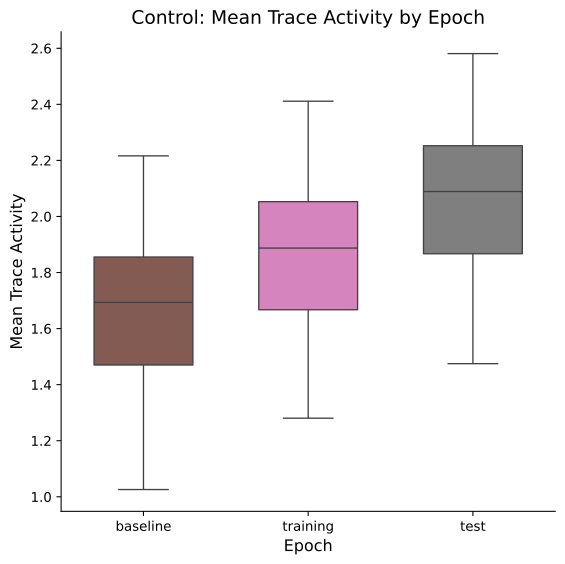
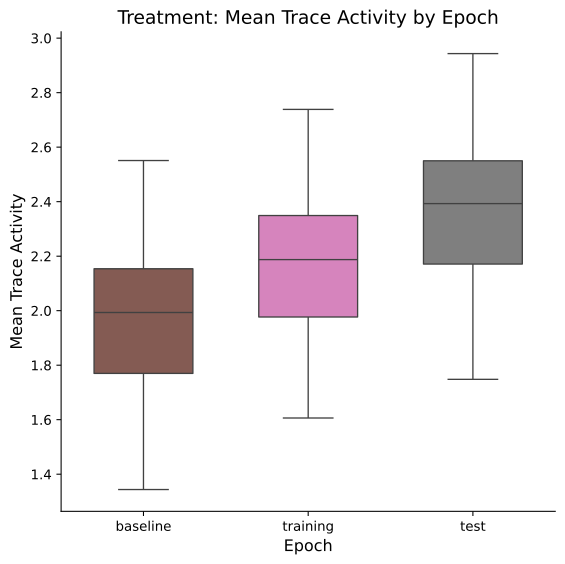
- Generates per-group boxplots/CDFs for activity and correlations, modulation distributions, and comparison-level summaries for the selected dimension.
Outputs
Key artifacts include:
Per-group combined data
The analysis tables surface combined activity, correlation, and modulation data for each group. Each table lists state, epoch, group name, normalized subject ID, source filename, cell index, and the associated activity/correlation/modulation metrics so users can download or filter them directly.
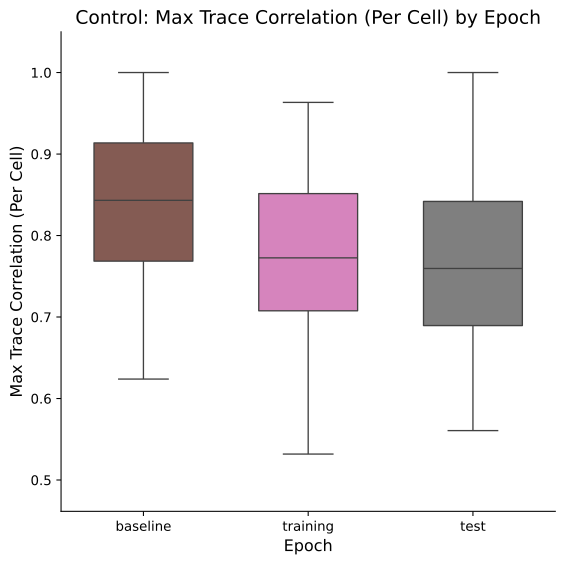
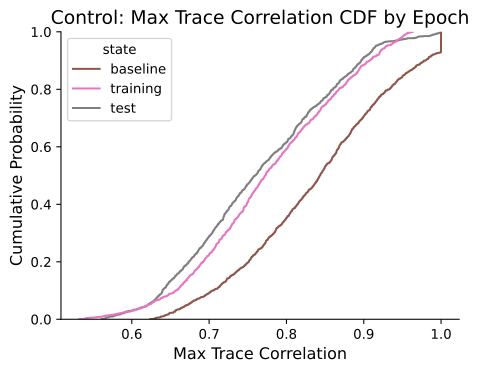
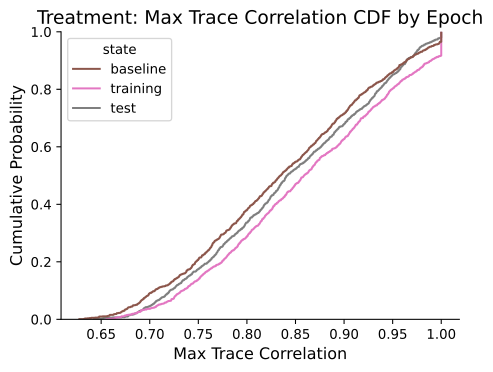
Preview figures accompany every combination, covering trace and event activity boxplots, correlation boxplots/CDFs, population correlation summaries, and modulation distributions. These previews mirror the metric selection (trace, event, or both) configured at run time.
Trace statistical summaries
Users receive ANOVA-style summaries and pairwise comparison tables for every trace-level metric. Each summary captures the comparison name, tested effect (group/state/epoch), degrees of freedom, sum of squares, F statistic, uncorrected and corrected p-values, plus the reported effect size.
Pairwise tables expose the exact contrasts (e.g., Control vs Treatment), whether tests were paired, the statistic/d.o.f., and both raw and adjusted p-values so downstream reporting matches what the analysis tables display.
Event statistical summaries (when event data are available)
When event measures are enabled, the analysis tables include parallel ANOVA and pairwise outputs for event activity, following the same column schema as the trace summaries.
Optional LMM outputs
If enable_lmm_analysis and save_lmm_outputs are True, the analysis tables list per-measure mixed-model summaries with fixed-effect estimates, standard errors, degrees of freedom, test statistics, and p-values for every requested state or epoch.
Comparison previews
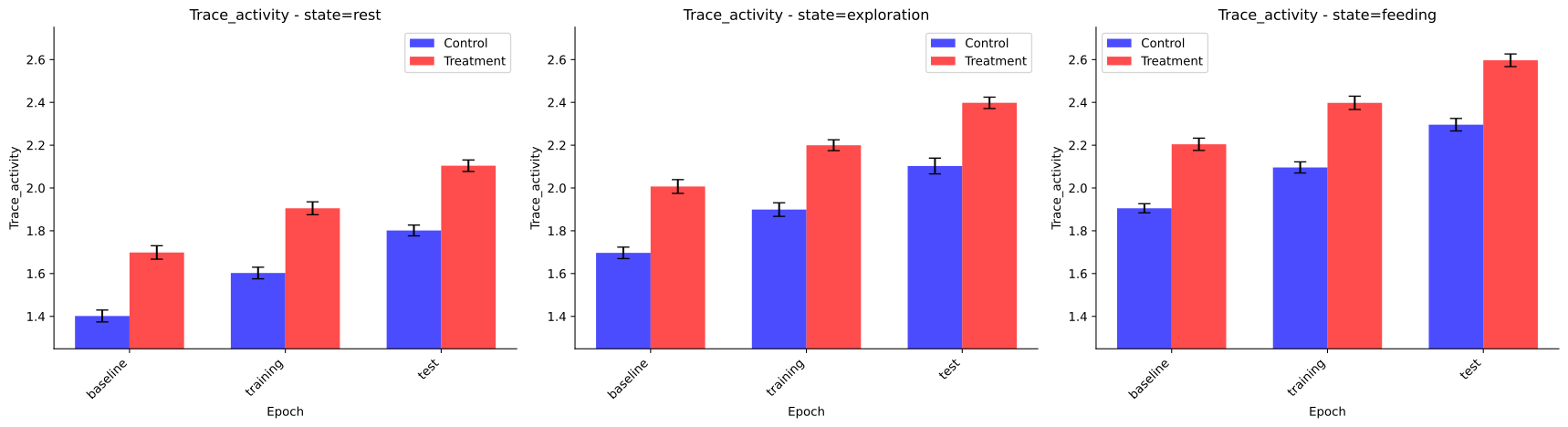
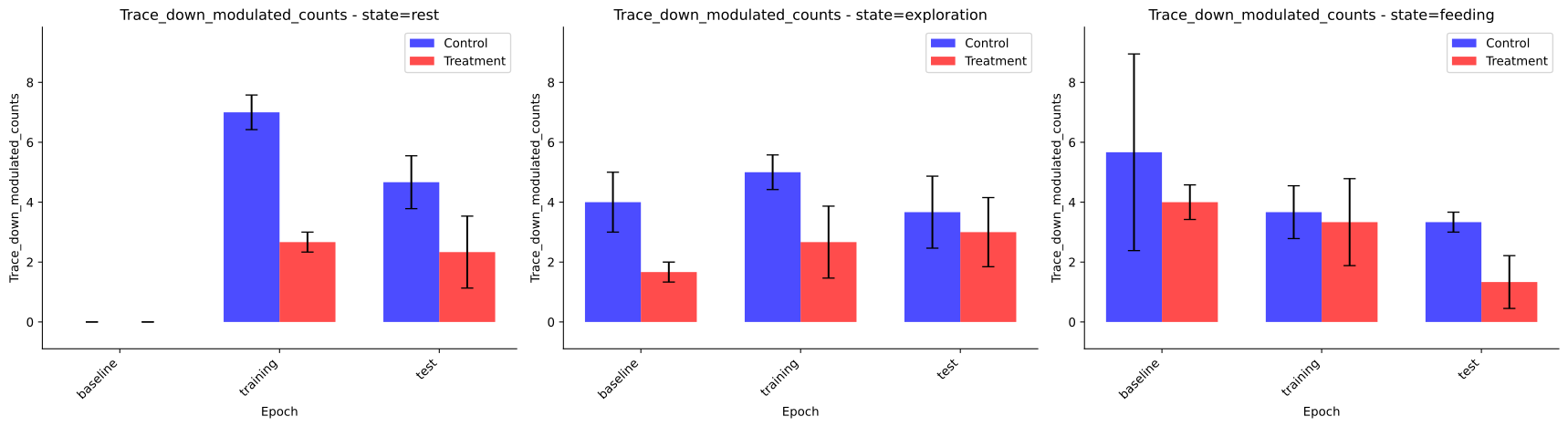
Comparison-level figures (state- or epoch-focused) highlight trace activity, correlation, positive vs negative correlation trends, modulation fractions, and up/down modulated cell counts. When event data are analyzed, matching event previews are added.
All tables share a consistent schema with explicit metadata columns for states/epochs, group labels, subject IDs, and statistical annotations (test type, effect size, corrected p-values).
Example Combined Activity Output
| state | epoch | group_name | normalized_subject_id | filename | cell_index | mean_trace_activity | mean_event_rate |
|---|---|---|---|---|---|---|---|
| rest | baseline | Control | subj_001 | recording_001.isxd | 0 | 0.125 | 0.018 |
| rest | baseline | Control | subj_001 | recording_001.isxd | 1 | 0.142 | 0.012 |
| rest | baseline | Treatment | subj_005 | recording_005.isxd | 0 | 0.163 | 0.020 |
| rest | training | Control | subj_001 | recording_001.isxd | 0 | 0.179 | 0.024 |
| rest | training | Treatment | subj_005 | recording_005.isxd | 0 | 0.211 | 0.029 |
Example Combined Correlation Output
| state | epoch | group_name | normalized_subject_id | filename | max_trace_correlation | mean_trace_correlation | positive_trace_correlation |
|---|---|---|---|---|---|---|---|
| rest | baseline | Control | subj_001 | recording_001.isxd | 0.83 | 0.21 | 0.34 |
| rest | baseline | Treatment | subj_005 | recording_005.isxd | 0.87 | 0.24 | 0.36 |
| rest | training | Control | subj_001 | recording_001.isxd | 0.78 | 0.18 | 0.30 |
| rest | training | Treatment | subj_005 | recording_005.isxd | 0.81 | 0.22 | 0.33 |
Example Combined Modulation Output
| state | epoch | group_name | filename | cell_index | trace_modulation_scores | trace_p_values | trace_modulation | trace_up_modulation_number | trace_down_modulation_number |
|---|---|---|---|---|---|---|---|---|---|
| rest | training | Control | recording_001.isxd | 0 | 0.18 | 0.032 | 1 | 12 | 3 |
| rest | training | Control | recording_001.isxd | 1 | -0.09 | 0.210 | 0 | 12 | 3 |
| rest | training | Treatment | recording_005.isxd | 0 | 0.31 | 0.004 | 1 | 15 | 1 |
| rest | training | Treatment | recording_005.isxd | 2 | -0.22 | 0.012 | -1 | 15 | 1 |
Example Trace ANOVA Output
| comparison | state_or_epoch | effect | df1 | df2 | SS | MS | F | p_unc | p_corr | effect_size |
|---|---|---|---|---|---|---|---|---|---|---|
| trace_activity | rest | group | 1 | 10 | 0.024 | 0.024 | 6.42 | 0.030 | 0.060 | 0.39 |
| trace_activity | rest | epoch | 2 | 20 | 0.011 | 0.005 | 2.14 | 0.143 | 0.286 | 0.21 |
| trace_activity | rest | interaction | 2 | 20 | 0.004 | 0.002 | 0.81 | 0.459 | 0.918 | 0.09 |
Example Trace Pairwise Output
| comparison | contrast | state_or_epoch | A | B | paired | parametric | statistic | dof | p_unc | p_corr | p_adjust | effect_size |
|---|---|---|---|---|---|---|---|---|---|---|---|---|
| trace_activity | group | rest | Control | Treatment | False | True | -2.53 | 10 | 0.030 | 0.060 | bonf | -0.72 |
| trace_activity | epoch | Control | baseline | training | True | True | -1.61 | 5 | 0.164 | 0.328 | bonf | -0.37 |
Example LMM Output (optional)
| measure | fixed_effect | estimate | std_error | df | t_value | p_unc | group | state_or_epoch |
|---|---|---|---|---|---|---|---|---|
| trace_activity | group | -0.041 | 0.016 | 96 | -2.62 | 0.010 | Treatment | rest |
| trace_activity | epoch | 0.018 | 0.007 | 96 | 2.57 | 0.012 | Treatment | training |
Previews
The preview examples below correspond to the epochs comparison mode (Group 1 vs. Group 2 across epochs) using trace metrics. When comparison_dimension="states" or when measure_source includes events ("event" or "both"), the tool generates the same family of figures with state-level layouts and/or event-specific data, following the exact styling shown here.
Additional per-group previews for positive/negative population correlations and the event-based activity/correlation/modulation plots are produced automatically when those modalities are analyzed. Similarly, comparison-level modulation prevalence figures (states/epochs_comparison_{trace|event}_modulation.svg) accompany the up/down count charts even though only the trace-based epoch examples are illustrated below.
Group-level activity and correlation

Modulation distributions


Comparison summaries