Detect Events from GPIO Data
This tool uses 0.5 compute credits per hour.
Overview
A General Purpose Input Output (GPIO) file contains information about important events (coded as
pulses or step-signal transitions) that were monitored during the experimental recording. The Detect GPIO events
tool extracts the timestamps of the events from one or more specified channels in the GPIO file.
Parameters
| Parameter | Required? | Default | Description |
|---|---|---|---|
| Input File | True | N/A | path to the input file |
| GPIO Channel Name | True | GPIO-1 | Primary GPIO channel for event extraction |
| Additional GPIO Channel Name(s) | False | Optional comma-separated additional GPIO channel names (e.g. GPIO-2,GPIO-3) | |
| Pulse threshold | True | 0.5 | Fraction(s) of max signal value used as pulse threshold. Provide a single value or a comma-separated list matching all selected channels. |
| Event Type | True | onset | Event type(s) onset/offset. Provide a single value or a comma-separated list matching all selected channels. |
Input File
The input to this tool consists of a single GPIO file that contains either analog or logical data originally recorded with a nVoke/nVista DAQ box.
| Source Parameter | File Type | File Format |
|---|---|---|
| Input File | gpio_traces, gpio_data | gpio, gpio |
GPIO Channel
Events can be extracted from one or more of the following GPIO channels:
- Digital GPI 0...7
- Digital GPO 0...7
- GPIO-1...4
- EX-LED, EX-LED1 or EX-LED2
- OG-LED
- DI-LED
- e-focus
- BNC Sync Output
- BNC Trigger Input
To detect events from multiple channels in one run, provide the first channel in GPIO Channel Name and any additional channels in Additional GPIO Channel Name(s) as a comma-separated list.
Pulse Threshold
Pulse threshold accepts either:
- a single value from 0 to 1, applied to all selected channels, or
- a comma-separated list of values (one per selected channel, in channel order).
Event Type
An event can be defined as the time at which a pulse onset or an offset is encountered. Event Type accepts either:
- a single value (
onsetoroffset) applied to all selected channels, or - a comma-separated list (
onset/offset) with one value per selected channel.
Output Data
The output of this tool is a h5 events file that contains the timestamps of the events
detected on the selected GPIO channel(s).
For one or more channels, the file is organized under events with one subgroup per output event_label:
events/<event_label>/Time: timestamp array for that event label
Examples:
events/GPIO-2/Timeevents/GPIO-2_onset/Timeevents/GPIO-2_offset/Time
Channel information is encoded in event_label (there is no separate event-channel field).
event_label is the channel name (for example, GPIO-2). It uses a channel+onset/offset combination
(for example, GPIO-2_onset, GPIO-2_offset) only when the same channel is exported with both onset and offset.
When the same channel is exported more than once with different event definitions, output event labels are
disambiguated with suffixes such as _onset and _offset.
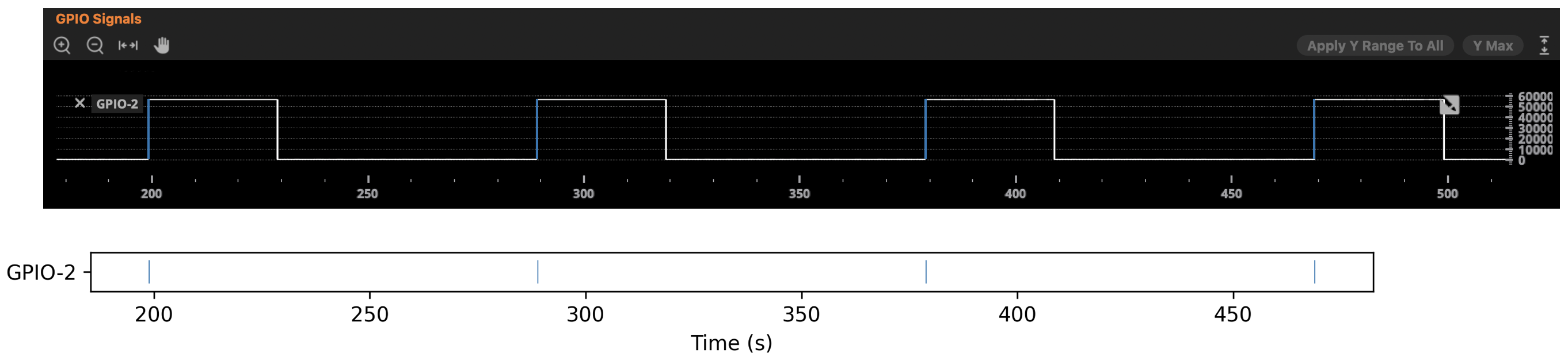
The diagram below illustrates the events detected on channel GPIO-2 of a given GPIO file.
The input pulses are visualized in the Inscopix Data Processing Software in the top panel.
The bottom panel shows the corresponding events extracted from this channel when
identifying event times based on pulse onsets.
Next Steps
After running this tool, the output events file can be used as input to the Peri-Event Analysis Workflow tool.