Convert Vessel Set To CSV And TIFF
Overview
This tool allows you to convert an ISXD vessel set file to: CSV files containing vessel trace and footprint data, and a set of TIFF files containing vessel image data.
Use this tool if you want to use this data in another application that requires data to be in these formats.
This tool uses 0.5 compute credits per hour.
Inputs
| Parameter | Required? | Default | Description |
|---|---|---|---|
| Vessel Set Files | True | N/A | Vessel set files to convert |
| Time Reference | True | start | How time is encoded: as unix time or from the start of the recording |
File Inputs
| Source Parameter | File Format |
|---|---|
| Vessel Set Files | isxd |
Vessel Set Files
One or more vessel set files. If more than one vessel set file is provided, they should be a valid series. A series input can also be provided.
Time Reference
Should be either start or unix.
The time reference for the CSV time stamps.
- If
startis used, the time stamps represent the seconds since the start of the vessel set. - If
unixis used, the time stamps represent the seconds since the Unix epoch.
Outputs
Exporting a vessel set can result in several types of output files. The types of output files that are generated depend on the type of vessel set.
Vessel sets are classified as one of two types:
- Vessel diameter: These vessel sets store vessel diameter estimates computed from the Estimate Vessel Diameter tool
- Red blood cell (RBC) velocity: These vessel sets store RBC velocity estimates computed from the RBC velocity tool in IDPS
The following sections break down the types of output files that can be exported from a vessel set.
Output Files (All Vessel Sets)
The following output files are always exported from a vessel set.
Vessel Traces (CSV)
Vessel set trace data is exported to csv, in tidy data format. Each row of the csv will contain data of a measurement at a single time-point for one vessel. If the input vessel set is a series, the time-points are concatenated as rows in the csv file. Depending on the type of the vessel set, vessel diameter or red blood cell velocity, the columns in the csv will slightly differ. However, for both types of vessel sets, the following columns are exported.
- Vessel ID: The name of the vessel
- Vessel Status: The status of the vessel, either
accepted,undecided, orrejected - Index: The zero-based index of the trace
- Time(s): The time in seconds of the trace, either relative to the start time of the vessel set, or as a Unix timestamp
Depending on the type of estimates stored in the vessel set file, additional columns will be exported, described in the sub-sections below.
Vessel Diameter Traces
For vessel sets storing vessel diameter estimates computed from the Estimate Vessel Diameter tool, the following additional metrics are exported:
- Diameter: The estimated vessel diameter in px or um
- Model Fit Center: An index on the vessel line where the model fit center occurs
The following table shows an example of exported vessel set traces containing vessel diameter estimates.
| Vessel ID | Vessel Status | Index | Time (s) | Diameter (um) | Model Fit Center |
|---|---|---|---|---|---|
| V0 | undecided | 0 | 1 | 36.997 | 84.515 |
| V0 | undecided | 1 | 2 | 36.289 | 84.159 |
| V0 | undecided | 2 | 3 | 35.999 | 83.713 |
| V0 | undecided | 3 | 4 | 36.321 | 83.556 |
| V0 | undecided | 4 | 11.05 | 36.694 | 83.752 |
| V0 | undecided | 5 | 12.05 | 36.527 | 83.868 |
| V0 | undecided | 6 | 13.05 | 36.372 | 83.900 |
Red Blood Cell Velocity Traces
For vessel sets storing red blood cell (RBC) velocity estimates, the following additional metrics are exported:
- Velocity: The estimated RBC velocity in px/s or um/s
- Direction(deg): The estimated direction of blood flow in degrees relative to the positive x-axis
- Clipping Error: Indicates if clipping occurred in one or more heatmaps
- Direction Change Error: Indicates if the direction of blood flow changed significantly between temporal offsets
- No Significant Pixels Error: Indicates if there were no significant pixels in one or more heatmaps
- Invalid Frame Error: Indicates if an invalid frame occurred in a window of the input movie
The following table shows an example of exported vessel set traces containing RBC velocity estimates.
| Vessel ID | Vessel Status | Index | Time (s) | Velocity (um/s) | Direction (deg) | Clipping Error | Direction Change Error | No Significant Pixels Error | Invalid Frame Error |
|---|---|---|---|---|---|---|---|---|---|
| V0 | undecided | 0 | 1 | 2800.791 | 248.087 | False | False | False | False |
| V0 | undecided | 1 | 2 | 3007.701 | 247.697 | False | False | False | False |
| V0 | undecided | 2 | 3 | 3026.005 | 247.423 | False | False | False | False |
| V0 | undecided | 3 | 4 | 3320.473 | 247.733 | False | False | False | False |
| V0 | undecided | 4 | 5 | 2187.080 | 246.729 | False | False | False | False |
| V0 | undecided | 5 | 6 | nan | nan | False | False | False | True |
Map of Footprints (TIFF)
Similar to cell contour maps, exporting a vessel set generates a contour map which contain an overlay of all the vessel lines (or ROIs) in a vessel set.

Line Traces (CSV)
In addition to vessel set trace data, it is also possible to export metadata about the vessel lines, or ROIs, including:
- The vessel name
- The vessel status, either
accepted,undecided, orrejected - The coordinate points of the vessel ROIs. Two points for a vessel diameter line, or four points for a RBC velocity box.
- The color of the vessel ROIs
The following table shows an example of an exported vessel set lines from vessel diameter estimates.
| Name | Status | ColorR | ColorG | ColorB | StartPointX | StartPointY | EndPointX | EndPointY | Length (pixels) |
|---|---|---|---|---|---|---|---|---|---|
| V0 | undecided | 255 | 255 | 255 | 96 | 95 | 222 | 182 | 153.118 |
| V1 | undecided | 255 | 255 | 255 | 348 | 301 | 406 | 311 | 58.8558 |
| V2 | undecided | 255 | 255 | 255 | 439 | 302 | 482 | 357 | 69.814 |
| V3 | undecided | 255 | 255 | 255 | 110 | 355 | 128 | 409 | 56.921 |
If the vessel set type is RBC velocity then the maximum velocity for each vessel ROI is also exported. This is estimated using the length of the box (assumed to be the long side of the box) and the frame rate of the input movie. The following table shows an example of an exported vessel set lines from RBC velocity estimates.
| Name | Status | ColorR | ColorG | ColorB | PointX0 | PointY0 | PointX1 | PointY1 | PointX2 | PointY2 | PointX3 | PointY3 | Max Velocity (um/s) |
|---|---|---|---|---|---|---|---|---|---|---|---|---|---|
| V0 | undecided | 255 | 255 | 255 | 124 | 25 | 153 | 36 | 90 | 202 | 61 | 191 | 6882.64 |
| V1 | undecided | 255 | 255 | 255 | 24 | 42 | 43 | 34 | 85 | 148 | 65 | 156 | 4709.46 |
Velocity Only Outputs
The following outputs are only generated when an RBC velocity vessel set is exported.
Heatmaps (TIFF)
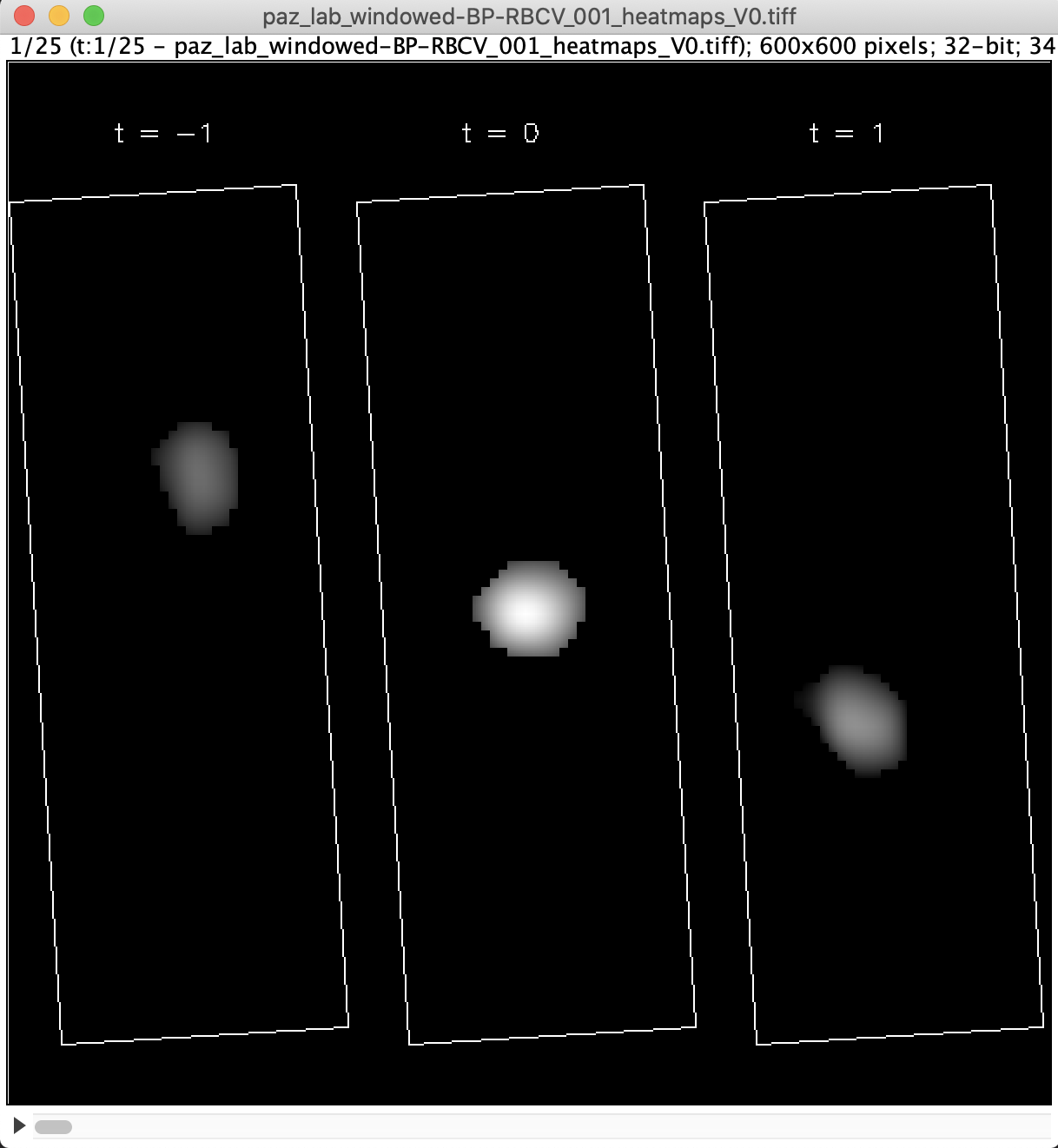
If a vessel set type is RBC velocity, and correlation heatmaps were saved to the vessel set, then it’s possible to export the correlation heatmaps as TIFF stacks. Heatmaps are exported as a zip file, containing one TIFF stack for each vessel in a vessel set. Each frame of a TIFF stack contains the correlation heatmaps used to estimate velocity for a particular vessel and time-point.